
Guide · Connector API v1
Build a connector, step by step
From an empty project to a connector that passes the conformance check. Each step has its goal, a diagram, the minimal code, how to know it works and links to the specification.
Step 0 of 11
What you'll build
Know the pieces of a connector, which are required and which are optional, before writing any code.
A connector lives inside a shop platform (a module, an app, a plugin, a headless backend…) and connects it to Spaidoo. It declares the capabilities it implements, and Spaidoo acts on that declaration, never on the name of the platform (§1).
| Capability | What it gives the shop | Needed? |
|---|---|---|
catalog.feed | Spaidoo knows the shop's products: price, stock, images. | Required |
catalog.changes | Price and stock changes reach Spaidoo in seconds instead of on the next daily read. | Optional |
identity | A signed-in customer keeps their saved products on every device, without a Spaidoo account. | Optional |
customers | Spaidoo can ask for the email and marketing consent of an identified customer when the merchant needs it. | Optional, with identity |
customerErase | Deleting a customer in the shop deletes their Spaidoo data for that shop. | Optional |
wishlistImport | Lists from a previous wishlist extension are brought into Spaidoo. | Optional, with identity |
push | Web push notifications are served from the shop's own domain. | Optional |
domainVerification | The shop proves it owns its domain without DNS changes. | Optional |
storefront.saveAnchors | Your theme prints the save buttons; the widget draws them and handles the click. | Optional |
How long it takes
It depends on your platform, but the work splits cleanly. The minimum is steps 2 to 5 (register, pairing, handshake, product feed) plus the script of step 8: with that, the widget runs on the shop with its catalogue. Every other capability is an independent piece: build it, declare it in the handshake and check it on its own.
Three things help along the way: the specification, which is the contract and always wins; the online conformance check; and, for Spaidoo partners, the assistant.
How you know it works
- You can name the capabilities you will declare, and you know
catalog.feedis the only required one.
Step 1 of 11
Before you start
Have a test shop that Spaidoo can reach, and the accounts you need.
- A test installation of your platform, reachable from the internet over https. Spaidoo calls the shop (it reads the feed, calls the signed routes, fetches the verify route) and so does the conformance check:
localhostis not enough (§8). - A staging domain, or a tunnel to a shop running on your machine: ngrok or Cloudflare Tunnel give it a public https host.
- A Spaidoo partner account with access to the developers area. You register your connector there (step 2), and it opens the assistant (step 11).
- A Spaidoo account for the test shop. You create it when you pair the shop (step 3), as a merchant would.
# Either one, pointing at the shop on your machine (port 8080 here)
ngrok http 8080
cloudflared tunnel --url http://localhost:8080Configure the shop to use the tunnel's host as its own domain. Every storefront URL the connector declares must be https on one of the shop's domains (§4.1), and so must the callback of a connector installed in each shop (§3.1).
Keep the two secrets in mind from the start: the API key and the identity secret are secrets of the shop, stored server-side and never printed in pages (§2.1).
How you know it works
- The shop opens through its public https URL from another network (your phone on mobile data, say).
Step 2 of 11
Register your connector
Your connector has a client_id, the one every shop connects with.
Shops connect with OAuth 2 and PKCE, as a registered app (§3). Register your connector once, in My connectors, and keep its client_id: it is public, it goes in the URL that starts the connection.
| Type | When | Callback |
|---|---|---|
Installed in each shop (shop) | Your connector runs on each shop's own server: a module, a plugin. | An https URL on the domain of the shop being connected. Nothing to register. |
Hosted (fixed) | Your connector runs on your servers or the platform's, and the merchant's admin is not on the shop's domain. | The exact URLs you register. |
- Server domains: where your server routes (
urls.customers) live, if not on the shop's domain. Storefront routes always go on the shop's domains (§4.1). - The
platformof the app (my-platform) is free text, informative only.
How you know it works
- My connectors lists your app with its
client_id.
Reference
Specification
Step 3 of 11
Pair the shop
The merchant connects the shop from your admin and your server receives its API key.
Pairing is an OAuth 2 flow with PKCE, in a popup: your admin opens Spaidoo in a popup, Spaidoo sends the popup back to your callback with a one-time code, and your server trades it for the API key. The popup only tells your admin page it is done, and closes. The key never goes through the browser (§3.2).
- Your server generates a random
stateand acode_verifier, keeps both (tied to the merchant's session), and computescode_challenge = base64url(SHA-256(code_verifier)). - Your admin page opens a popup (
window.open, on the merchant's click) athttps://admin.spaidoo.com/connectwithclient_id,redirect_uri,state,code_challenge,code_challenge_method=S256, the shop'sdomainand, optionally,name,email,modeandverify(yoururls.verify, only withdomainVerification). - The merchant signs up or logs in to Spaidoo and accepts the terms.
- Spaidoo sends the popup to your
redirect_uriwithcodeandstate(orerror=access_deniedif the merchant cancels). Check thestate. - Your server calls
POST /pairing/tokenwithclient_id,code,code_verifierand the sameredirect_uri, within 60 seconds, and gets{ apiKey, shopId }. - Store the key and call
POST /handshake(next step). The callback page tells your admin page withpostMessage(your own origin only, never the key) and closes the popup.
import { createHash, randomBytes } from "node:crypto";

const CLIENT_ID = "sc_…"; // from My connectors
const REDIRECT_URI = "https://shop.example.com/admin/spaidoo/callback";

// In your admin page: the merchant's click opens the popup.
//   const popup = window.open("/admin/spaidoo/connect", "spaidoo", "width=460,height=780");
//   window.addEventListener("message", (e) => {
//     if (e.origin !== location.origin || e.source !== popup) return;
//     if (e.data?.type === "spaidoo-connected" && e.data.connected) location.reload();
//   });

// 1. The popup starts here and goes on to Spaidoo.
app.get("/admin/spaidoo/connect", (req, res) => {
  const state = randomBytes(16).toString("hex");
  const verifier = randomBytes(48).toString("base64url");
  req.session.spaidoo = { state, verifier };
  const challenge = createHash("sha256").update(verifier).digest("base64url");
  res.redirect(
    "https://admin.spaidoo.com/connect?" +
      new URLSearchParams({
        client_id: CLIENT_ID,
        redirect_uri: REDIRECT_URI,
        state,
        code_challenge: challenge,
        code_challenge_method: "S256",
        domain: "shop.example.com",
        name: "My shop",
        email: "merchant@example.com",
        verify: "https://shop.example.com/spaidoo/verify", // only with domainVerification
      }),
  );
});

// 2. The popup comes back from Spaidoo.
app.get("/admin/spaidoo/callback", async (req, res) => {
  const pending = req.session.spaidoo;
  if (!pending || req.query.state !== pending.state) return res.status(400).send("Start again");

  // A shop of Spaidoo's directory proves its domain first (§3.3).
  if (req.query.verification_code) {
    store.set("verificationCode", req.query.verification_code); // served at urls.verify
    return res.redirect(req.query.resume); // back to Spaidoo, same state
  }

  delete req.session.spaidoo;
  let connected = false;
  if (!req.query.error) {
    const answer = await fetch("https://api-plugin.spaidoo.com/connector/v1/pairing/token", {
      method: "POST",
      headers: { "Content-Type": "application/json" },
      body: JSON.stringify({
        client_id: CLIENT_ID,
        code: req.query.code,
        code_verifier: pending.verifier,
        redirect_uri: REDIRECT_URI,
      }),
    }).then((r) => r.json());
    store.set("apiKey", answer.apiKey); // server-side, never in a page
    await handshake(); // next step
    connected = true;
  }

  // 3. Tell the admin page (same origin, never the key) and close the popup.
  res.send(`<script>
    window.opener?.postMessage({ type: "spaidoo-connected", connected: ${connected} }, location.origin);
    window.close();
  </script>`);
});
A shop already in Spaidoo's directory
If the domain already belongs to a shop in Spaidoo's directory, it is only handed over once the domain is proven. When you pass verify, Spaidoo first comes back to your callback with verification_code and resume: store the code so urls.verify serves it (step 9), keep the code_verifier, and send the popup to resume. The code comes later, with the same state (§3.3).
What to store, and where
- The API key, server-side (your platform's configuration or database), never in a page. It goes as
Authorization: Bearer <apiKey>on every call tohttps://api-plugin.spaidoo.com/connector/v1(§2, §2.1). - A
401or403from Spaidoo means the key is no longer valid: show the shop as disconnected. A5xxor a network failure only means "try later": the shop must keep working when Spaidoo does not answer (§2).
How you know it works
- Your server holds a key and
GET /statuswith it answers200with the shop'sstore(§4.3).
Step 4 of 11
The handshake
Tell Spaidoo what your connector can do and where, and keep what it accepts.
POST /handshake declares your capabilities, the URLs of your routes and the storefront settings. It is idempotent (§4.1).
Start small. This body declares only the required capability; switch the others on as you build them:
{
  "contractVersion": 1,
  "platform": { "id": "my-platform", "version": "3.2.0" },
  "connector": { "version": "1.0.0" },
  "storeUrl": "https://shop.example.com",
  "capabilities": {
    "catalog.feed": true,
    "catalog.changes": false,
    "identity": false,
    "customers": false,
    "customerErase": false,
    "wishlistImport": false,
    "push": false,
    "domainVerification": false,
    "storefront.saveAnchors": false
  },
  "urls": {},
  "storefront": { "excludePaths": ["^/checkout", "^/cart"] },
  "identitySecretFingerprint": null
}- Declare only what you implement. A URL is required only for a declared capability that needs it. Every URL must be
https: storefront ones on one of the shop's domains, server ones (customers) there or on your app's server domains.storefront.domainsadds other domains the storefront is served on (§4.1). loginmust contain the literal, unencoded marker{back}(step 6).storefront.excludePaths: case-insensitive regular expressions over the path + query where the widget must never run (checkout, payment).identitySecretFingerprint: the SHA-256 (hex) of the identity secret you hold, ornullwhen you hold none. That is how a reinstalled connector gets a new secret on its own.
Spaidoo answers with the shop id, the capabilities it accepted and, when you must store a new one, the identity secret:
{
  "shopId": "7f3c…",
  "contractVersion": 1,
  "capabilities": { "catalog.feed": true },
  "identitySecret": "b64url…"
}import { createHash } from "node:crypto";
const API = "https://api-plugin.spaidoo.com/connector/v1";
async function spaidoo(method, path, body) {
const res = await fetch(API + path, {
method,
headers: { Authorization: `Bearer ${store.get("apiKey")}`, "Content-Type": "application/json" },
body: body === undefined ? undefined : JSON.stringify(body),
});
if (res.status === 401 || res.status === 403) store.set("connected", false); // show "disconnected"
if (!res.ok) throw new Error(`Spaidoo ${res.status}`); // 5xx, network: try later, never break the shop
return res.status === 204 ? null : res.json();
}
const answer = await spaidoo("POST", "/handshake", handshakeBody());
store.set("shopId", answer.shopId);
// Act on what Spaidoo accepted, not on what you declared.
store.set("capabilities", answer.capabilities);
if (answer.identitySecret) {
store.set("identitySecret", answer.identitySecret); // server-side only, never printed
const fingerprint = createHash("sha256").update(answer.identitySecret).digest("hex");
await spaidoo("POST", "/identity-secret/ack", { fingerprint });
}- Behave according to the accepted list. A capability is refused (left out, not an error) when Spaidoo has it switched off;
customersandwishlistImportare refused withoutidentity. - Acknowledge every secret you receive, after storing it:
POST /identity-secret/ackwith its fingerprint. Until then Spaidoo keeps returning it in/handshakeand/status(§4.2). - After a rotation, Spaidoo keeps accepting the previous secret until the new one is acknowledged, and for 10 minutes after: a lost response does not break the shop.
When to handshake again
- After pairing.
- After every update of your connector.
- Whenever a URL or a capability changes.
Errors to handle: 400 CONNECTOR_CATALOG_REQUIRED (no catalog.feed), 400 CONNECTOR_URL_INVALID with the field at fault, and 400 CONNECTOR_EXCLUDE_PATH_INVALID.
How you know it works
POST /handshakeanswers200with your capabilities incapabilities.GET /statusshows your declaration inconnector, and no longer carriesidentitySecretonce you have acknowledged it.- The conformance check (step 10) checks the handshake.
Step 5 of 11
The catalogue
Spaidoo knows the shop's products: from a feed it reads every day, then from the changes you push.
The feed: catalog.feed (required)
A Google Merchant product feed (RSS 2.0 or Atom) with one item per variant. Serve one per language and register the complete list: a language missing from it is removed (§4.5).
PUT /connector/v1/catalog/feeds
Authorization: Bearer <apiKey>
Content-Type: application/json

{ "feeds": [ { "language": "en", "url": "https://shop.example.com/spaidoo/feed?lang=en" } ] }<?xml version="1.0" encoding="UTF-8"?>
<rss version="2.0" xmlns:g="http://base.google.com/ns/1.0">
<channel>
<title>My shop</title>
<link>https://shop.example.com</link>
<description>My shop's products</description>
<item>
<g:id>123-1</g:id>
<g:item_group_id>123</g:item_group_id>
<g:title>Blue shirt</g:title>
<g:link>https://shop.example.com/p/123</g:link>
<g:price>24.90 EUR</g:price>
<g:sale_price>19.90 EUR</g:sale_price>
<g:availability>in_stock</g:availability>
<g:image_link>https://shop.example.com/img/123.jpg</g:image_link>
</item>
</channel>
</rss>g:item_group_idis the product id for Spaidoo (one row per product); without it,g:idis. That product id is used everywhere else:data-sp-id,catalog.changes, wishlist import.- Required:
g:id,g:title,g:link(the canonical product URL),g:pricein the shop's base currency andg:availability(in_stock·out_of_stock·preorder·backorder). - Prices in other currencies go in
spaidoo:price currency="USD"(namespacehttps://spaidoo.com/ns/feed/1).
A large feed takes time to build. While it is being generated, answer 202 (or 503/429) with Retry-After: Spaidoo comes back then and does not take it as an empty catalogue. Any other error keeps the previous catalogue.
HTTP/1.1 202 Accepted
Retry-After: 120
POST /catalog/feeds/read asks for a read now (a button in your panel, say). Asked again within 3 minutes, it answers 429 with Retry-After.
Catalogue changes: catalog.changes
When a price or the stock changes in the shop, tell Spaidoo right away: price-drop alerts leave within minutes instead of on the next daily read, which stays as the reconciliation (§4.6).
{
  "changes": [
    {
      "type": "product.updated",
      "id": "123",
      "at": 1759219200,
      "price": { "amount": "24.90", "currency": "EUR" },
      "salePrice": { "amount": "19.90", "currency": "EUR" },
      "availability": "in_stock"
    },
    { "type": "product.deleted", "id": "456", "at": 1759219230 }
  ]
}product.updatedcarries onlyprice,salePrice(null= no sale),pricesin other currencies,availabilityand thevariantsthat changed, bysku. Every field is optional; a present one replaces the stored value.product.deleted: the product is no longer sold (deleted or disabled).atis when the change happened. Spaidoo ignores a change older than the one it already applied, so retries and out-of-order delivery are safe.- Up to 100 changes per request and 60 requests a minute. Coalesce bursts: a bulk edit of 2 000 products is 20 requests, not 2 000.
- New products, and changes to title, link, images or categories, arrive with the next feed read.
Note the product ids while the merchant's request runs and send them at its end, once the response has gone out, so the merchant never waits on Spaidoo:
// While the merchant's request runs: only note which products changed.
const pending = new Map(); // product id → unix time of the change

onProductSaved((product) => pending.set(String(product.id), Math.floor(Date.now() / 1000)));

// Once the response has gone out: up to 100 changes per call.
onRequestEnd(async () => {
  if (!store.get("capabilities")["catalog.changes"]) return;
  const changes = [...pending].map(([id, at]) => changeOf(id, at)); // product.updated or product.deleted
  for (let i = 0; i < changes.length; i += 100) {
    await spaidoo("POST", "/catalog/changes", { changes: changes.slice(i, i + 100) });
  }
});
Spaidoo answers 202 { accepted, unknown }: unknown lists ids it does not have yet, and it schedules a feed read. On failure, retry with backoff for up to 1 hour, then drop: the daily feed read corrects everything.
How you know it works
GET /statuslists your feeds instore.feeds, withlastReadAt,productsandstatus.- The conformance check reads your feeds and their items.
POST /catalog/changesanswers202with an emptyunknownfor products Spaidoo knows. It is a call to Spaidoo: the check lists it with how to check it by hand (§8).
Step 6 of 11
Customer identity
A customer signed in to the shop keeps their saved products on every device, without a Spaidoo account.
While the shop has a connector with identity, the shop's session rules: Spaidoo never asks the customer to log in to the shop on its behalf (§5).
The identity route
The widget calls GET <urls.identity>?anon=<uuid> from the storefront: same origin, with the shop's cookies. Answer 200 { "assertion": "…" } when a customer is signed in, 200 { "anonymous": true } when nobody is (guests count as nobody), and 410 when the connector is disconnected (§5.1).
Send Cache-Control: no-store, private and Vary: Cookie. The route must never be cached by a page cache or a CDN.
The assertion
A JSON payload and its HMAC-SHA256 with the identity secret (as UTF-8 text), both base64url without padding, joined by a dot (§5.2):
import { createHmac, randomBytes } from "node:crypto";

const UUID = /^[0-9a-f]{8}-[0-9a-f]{4}-[0-9a-f]{4}-[0-9a-f]{4}-[0-9a-f]{12}$/i;
const b64url = (text) => Buffer.from(text).toString("base64url"); // no padding

function assertion(secret, shopId, customerId, anon) {
  const iat = Math.floor(Date.now() / 1000);
  const payload = b64url(JSON.stringify({
    v: 1,
    shopId,
    customerId: String(customerId),
    email: "", // always empty: Spaidoo asks the customers route when it needs one
    anonId: UUID.test(anon ?? "") ? anon : null,
    iat,
    exp: iat + 60,
    jti: randomBytes(16).toString("hex"),
  }));
  const signature = createHmac("sha256", secret).update(payload).digest("base64url");
  return `${payload}.${signature}`;
}

// GET <urls.identity>?anon=<uuid> — same origin, with the shop's cookies.
app.get("/spaidoo/identity", (req, res) => {
  res.set({ "Cache-Control": "no-store, private", Vary: "Cookie" });
  if (!store.get("connected")) return res.sendStatus(410);
  const customer = signedInCustomer(req); // a guest counts as nobody
  if (!customer) return res.json({ anonymous: true });
  res.json({ assertion: assertion(store.get("identitySecret"), store.get("shopId"), customer.id, req.query.anon) });
});
exp - iatis 60 s at most; Spaidoo tolerates 30 s of clock skew.jtiis single use.anonIdechoes?anon=when it is a UUID, elsenull.emailis always"": Spaidoo does not keep the shop customers' emails (step 7).
The session hint (optional, recommended)
So that the widget notices a login or a logout without asking on every page, print SpaidooConfig.shopSession (step 8): "" when nobody is signed in, else the first 16 hex characters of HMAC-SHA256(identity secret, "session:" + customerId). It is a hint, not a proof (§5.3).
const shopSession = customer
  ? createHmac("sha256", secret).update("session:" + customer.id).digest("hex").slice(0, 16)
  : "";
The login URL
Declare urls.login with the literal {back} marker. When a customer who is not signed in wants to keep their list, the widget sends them there with {back} replaced by the URL-encoded page they were on. After login, the shop must redirect back to it, same domain only (§5.4).
How you know it works
curlthe identity route without cookies:{"anonymous": true}and the two cache headers.- With the
Cookieheader of a signed-in test customer: an assertion whose payload (base64url-decode the part before the dot) carries yourshopId, thecustomerIdand"email": "". - The conformance check tests the route and its assertions when you give it that
Cookieheader.
Step 7 of 11
The customers route
Spaidoo can ask the shop for the email and marketing consent of identified customers, and nobody else can.
Spaidoo does not store the shop customers' emails. When the merchant needs them (an export, a campaign audience, a sync to their email tool), Spaidoo asks your urls.customers, uses the answer at that moment and does not store it (§6.2).
Verify every call
Every call Spaidoo makes to a connector URL (except the public verify and feed) carries X-Spaidoo-Timestamp, X-Spaidoo-Nonce and X-Spaidoo-Signature: the base64url HMAC-SHA256 of timestamp + "." + nonce + "." + rawBody with the identity secret (§6.1).
import { createHmac, timingSafeEqual } from "node:crypto";

// The RAW body: the signature covers the bytes Spaidoo sent, not re-serialised JSON.
app.post("/spaidoo/customers", express.raw({ type: "*/*" }), async (req, res) => {
  const secret = store.get("identitySecret");
  if (!store.get("connected") || !secret) return res.sendStatus(410);

  const timestamp = req.get("X-Spaidoo-Timestamp") ?? "";
  const nonce = req.get("X-Spaidoo-Nonce") ?? "";
  const signature = Buffer.from(req.get("X-Spaidoo-Signature") ?? "");

  // 1. A timestamp more than 300 s away from our clock.
  const now = Math.floor(Date.now() / 1000);
  if (!/^\d+$/.test(timestamp) || Math.abs(now - Number(timestamp)) > 300) return res.sendStatus(401);

  // 2. The signature, compared in constant time.
  const expected = Buffer.from(
    createHmac("sha256", secret).update(`${timestamp}.${nonce}.`).update(req.body).digest("base64url"),
  );
  if (signature.length !== expected.length || !timingSafeEqual(signature, expected)) return res.sendStatus(401);

  // 3. A nonce seen in the last 600 s is a replay.
  if (!(await nonces.addIfNew(nonce, 600))) return res.sendStatus(401);

  const { customerIds } = JSON.parse(req.body.toString("utf8"));
  const customers = await findAccounts(customerIds); // no guests, no deleted ones
  res.json({
    customers: customers.map((c) => ({
      customerId: String(c.id),
      email: c.email,
      marketingConsent: c.newsletter ?? null, // null: the platform does not know
    })),
  });
});- Sign over the raw body, exactly as received: parsing and re-serialising the JSON changes the bytes.
- Compare the signatures in constant time.
- Remember nonces for 600 s and reject a repeated one, so a captured request cannot be replayed.
The answer
{ "customers": [ { "customerId": "123", "email": "ana@example.com", "marketingConsent": true } ] }- Up to 500 ids per call. Leave out customers that no longer exist, guests and deleted ones.
marketingConsent:truethe customer accepted the shop's marketing emails,falsethey did not,nullthe platform does not know.- Answer within 5 s;
410if the connector is disconnected.
How you know it works
- An unsigned
POSTto the route answers401. - Given a customer id of the test shop, the conformance check tests the nonce, the signature, the raw body, the age of the timestamp and the limits.
Step 8 of 11
The storefront
Print the widget on the shop's pages, never on the checkout, and serve the push worker.
On every page except the excluded ones, print the configuration and the loader. scriptUrl comes from GET /status and may change: always use the latest one (§4.3, §7).
<script data-spaidoo-config='{"currency":"EUR","shopSession":"","push":{"swUrl":"https://shop.example.com/spaidoo/push-sw.js","swScope":"/spaidoo-push/"}}'>
  (function (s) { window.SpaidooConfig = Object.assign(window.SpaidooConfig || {}, JSON.parse(s.getAttribute('data-spaidoo-config'))); })(document.currentScript);
</script>
<script src="{scriptUrl}" async></script>currency: the ISO code of the currency the visitor is browsing in; the widget shows prices in it (fromspaidoo:price).shopSession: the session hint of step 6.preview:trueonly for the shop's staff while the widget is inpreviewmode.push:{ swUrl, swScope }whenpushis declared.- A full-page cache must keep one copy per currency, as it already does for prices.
Never print the script on checkout or payment pages. List them in storefront.excludePaths in the handshake too: it is the safety net when a page slips through.
Save buttons (optional)
Where the theme should show Spaidoo's save icon, print an empty anchor with the feed's product id: the widget draws the icon and handles the click and the state. Style it with the --sp-save-* CSS custom properties, and declare storefront.saveAnchors. Any element with data-spaidoo-library opens the customer's list.
<span data-spaidoo-save
      data-sp-context="product"
      data-sp-id="123"
      data-sp-url="https://shop.example.com/p/123"
      data-sp-name="Blue shirt"
      data-sp-image="https://shop.example.com/img/123.jpg"></span>
data-sp-context is "product" on a product page and "list" on product cards; data-sp-name and data-sp-image are optional.
The push worker: push
Web push is registered on the shop's own domain, so the connector serves Spaidoo's service worker at urls.pushWorker (§7.1):
GET /spaidoo/push-sw.js

HTTP/1.1 200 OK
Content-Type: application/javascript
Service-Worker-Allowed: /spaidoo-push/
Cache-Control: no-cache

<the reference worker, copied verbatim from https://cdn.spaidoo.com/connector/v1/push-sw.js>- The body is the reference worker published at
https://cdn.spaidoo.com/connector/v1/push-sw.js: copy it verbatim; do notimportScriptsit from another origin. - It receives data-only messages
{ title, body, link, icon, image, badge, shopId }. Service-Worker-Allowedis only needed whenpushScopeis outside the worker's own directory. A worker served inside its scope (behind a platform's app proxy, say:/apps/spaidoo/push-sw.jswithpushScope/apps/spaidoo/) goes without it.
How you know it works
- The source of a product page shows
data-spaidoo-configand the loader; the source of the cart and the checkout shows neither. curl -I <urls.pushWorker>shows the headers.- Given a product page and the cart or checkout URL, the conformance check tests the loader,
SpaidooConfig, the save anchors, that nothing is printed on the checkout, and the push worker.
Step 9 of 11
Domain verification, erase and wishlist import
Three short capabilities: prove the domain, forward deletions, bring old wishlists.
Domain verification: domainVerification
The shop proves it owns its domain without DNS changes. Ask Spaidoo for a code, serve it at urls.verify as text/plain with nothing else in the body, then ask Spaidoo to check (§4.9).
POST /connector/v1/domain-verification
→ { "verified": false, "verificationCode": "spaidoo-verify-…", "domain": "shop.example.com" }

GET https://shop.example.com/spaidoo/verify
→ 200, Content-Type: text/plain
spaidoo-verify-…

POST /connector/v1/domain-verification/check
→ { "verified": true }urls.verifymust be on the domain being proven (or itswww.) and must not contain the code. Spaidoo does not follow redirects.- For a domain already in Spaidoo's directory, the proof comes before the key (step 3): the route must answer while the shop is being paired (§3.3).
- Without the capability, the merchant can still upload the code as
https://<domain>/spaidoo-verify.txt.
Customer erase: customerErase
When the shop deletes a customer (or receives a GDPR erasure request), call POST /customers/erase. Spaidoo deletes the customer's list anchored to this shop and unlinks any Spaidoo account from it. Guests need not be sent (§4.7).
POST /connector/v1/customers/erase
{ "customerId": "123" }
→ 204
Wishlist import: wishlistImport
POST /wishlists/import brings the lists of a previous wishlist extension: up to 50 customers per call, 100 lists per customer and 1 000 products per list, with the feed's product ids. Importing the same list twice does not duplicate it. It needs identity (§4.8).
{
  "customers": [
    { "customerId": "123", "lists": [
      { "id": "1", "name": "My wishlist", "isDefault": true, "products": ["123", "789"] }
    ] }
  ]
}
How you know it works
POST /domain-verification/checkanswers{ "verified": true }, and the conformance check tests the verify route.POST /customers/eraseanswers204. Erase and import are calls to Spaidoo: the check lists them with how to check them by hand (§8).
Step 10 of 11
Check it
Run the online conformance check until it passes with no failures for every capability you declare.
A connector is Spaidoo-compatible v1 when the online conformance check passes with no failures for every capability it declares. Spaidoo already holds your handshake and your identity secret: you only paste the test shop's API key, never a secret (§8).
- Open the conformance check and paste the API key of the test shop.
- Fill the optional fields to test more: a product page URL (loader,
SpaidooConfig, save anchors), the cart or checkout URL (nothing printed there), theCookieheader of a signed-in test customer (identity) and a customer id (customers route). - Run it: it takes a couple of minutes.
- Read the report, fix what fails and run it again. There are ten runs an hour per shop.
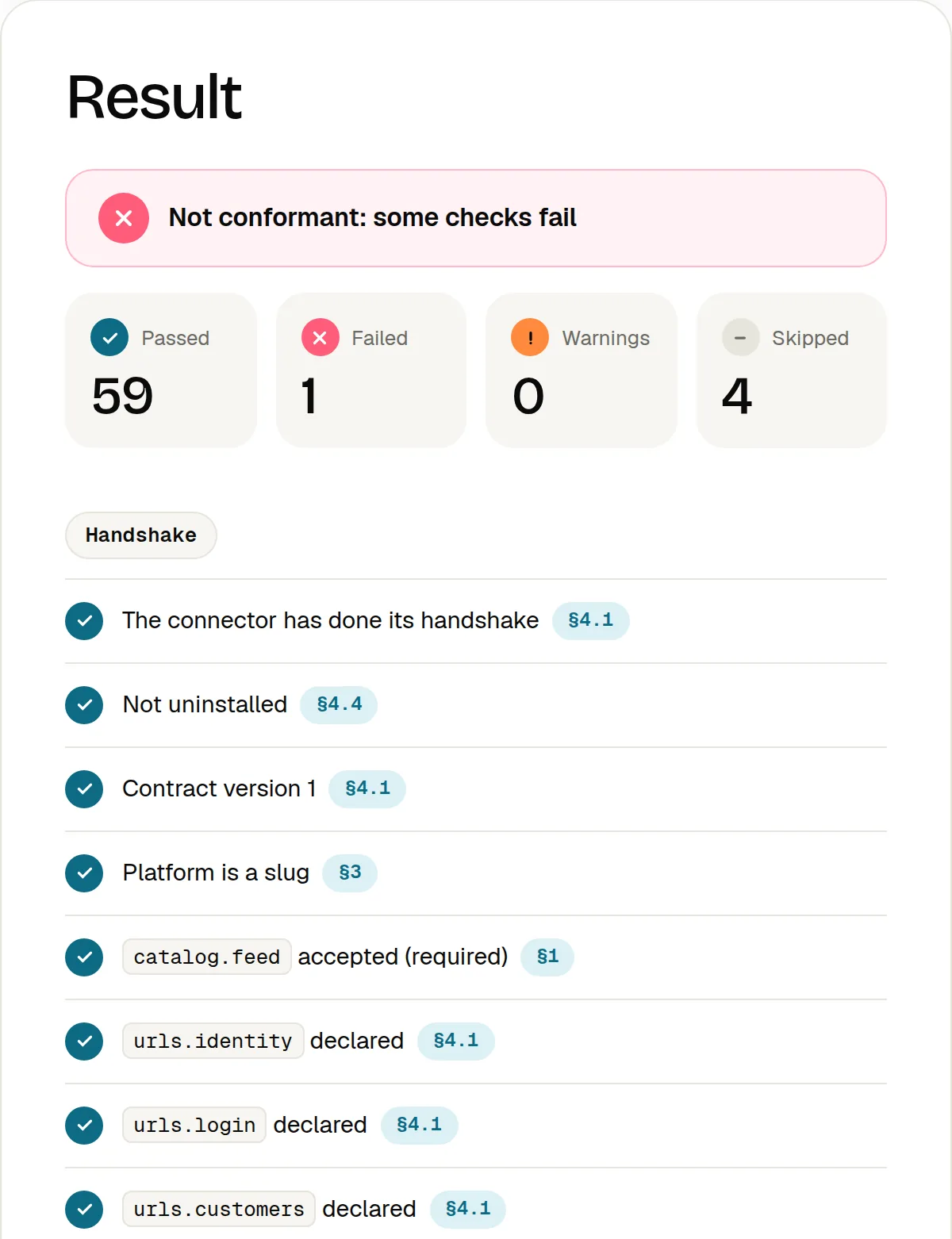
Reading the report
| Mark | What it means |
|---|---|
| Pass | The check passed. |
| Fail | The connector does not do what the specification asks. The line links to its section: fix it and run again. One failure is enough to be not conformant. |
| Warning | Not a failure: conformance does not depend on it, but read it. |
| Skipped | Not checked in this run. Fill the optional fields so that everything you declare gets checked. |
The calls your connector makes to Spaidoo (catalog.changes, customerErase, wishlistImport) cannot be tested from outside: the report lists them with how to check them by hand.
The same check is open to your own tooling: POST /connector/v1/conformance starts a run (202 { runId }) and GET /connector/v1/conformance/{runId} returns the report, kept for an hour.
How you know it works
- The report says Conformant with Connector API v1.
Step 11 of 11
Stuck?
Ask the assistant: it answers from the specification.
Spaidoo partners with access to the developers area can chat with the Connector API assistant. Sign in with your Spaidoo partner account: Spaidoo grants the access. Its answers link to the specification's sections, and your conversations are kept.
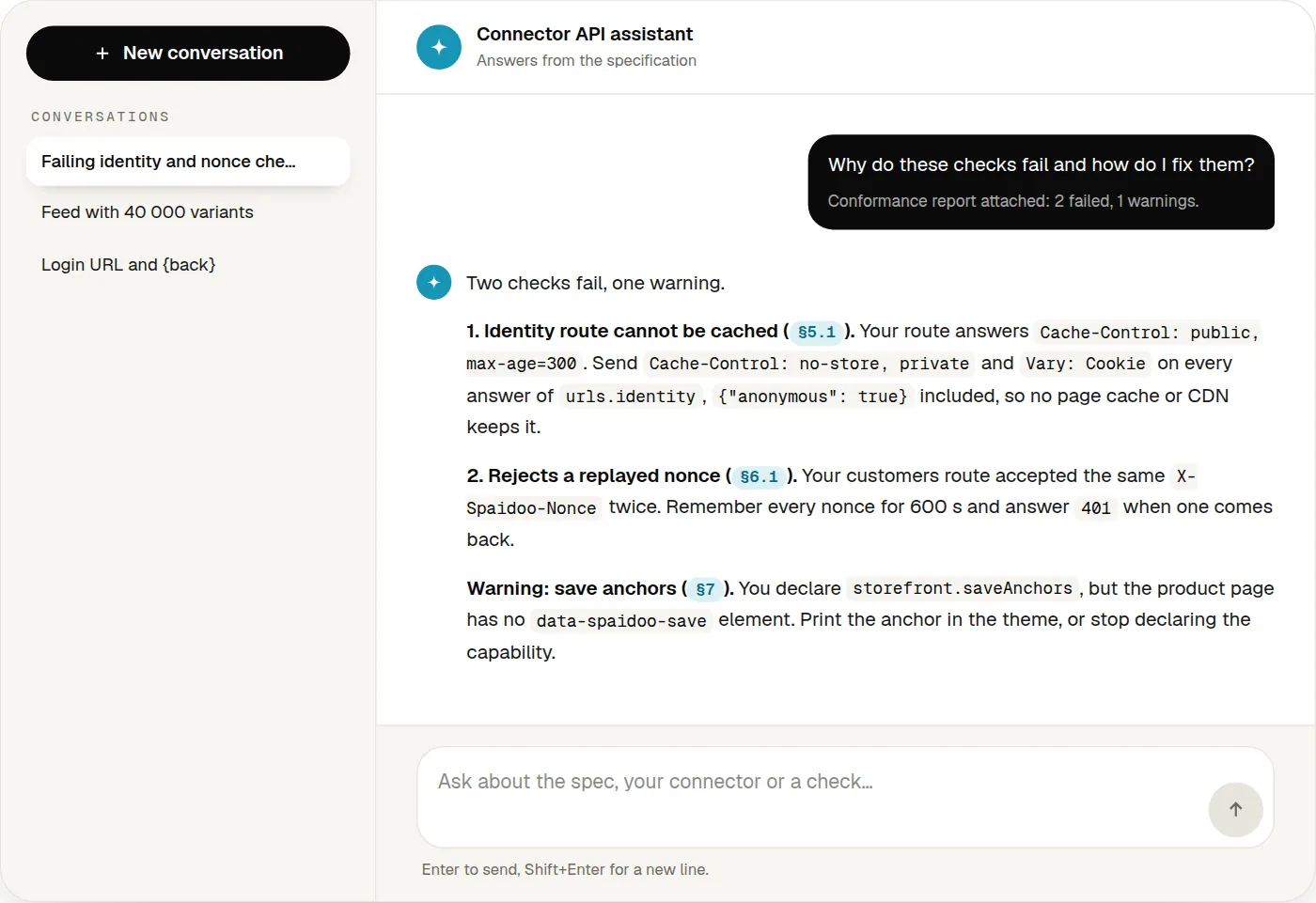
From a report of the conformance check, Ask the assistant about this report opens a new conversation with the report attached and a question ready: why do these checks fail and how do I fix them?
No access yet? Everything the assistant knows is in the specification, which the Reference box of every step links to.
How you know it works
- The assistant's answers cite the specification's sections as
§x.ylinks.